
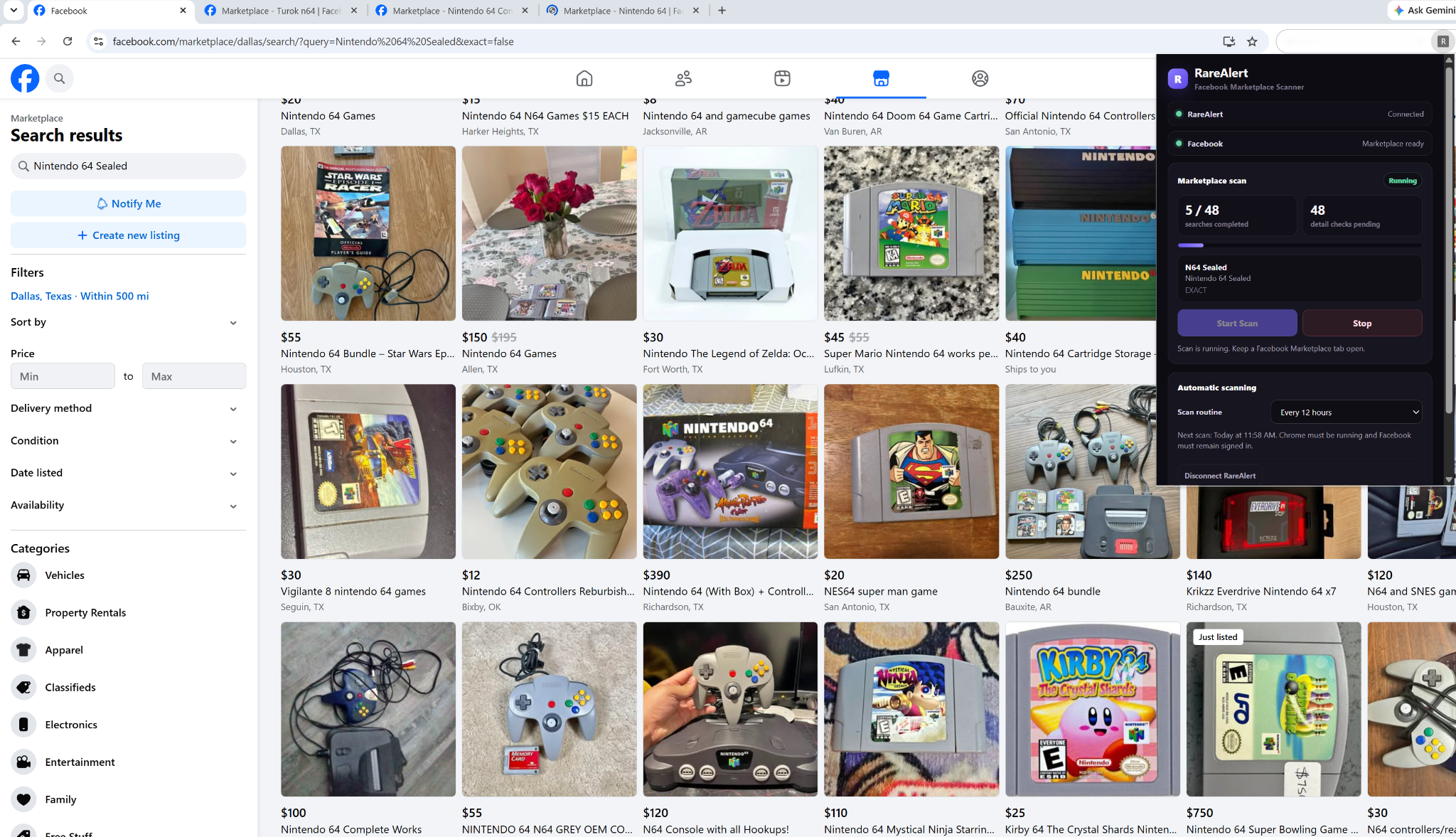
Why Facebook Marketplace does not have one simple nationwide search
Marketplace results are tied to the location and search radius selected in Facebook. That means a collector searching from one city can see a different pool of listings than someone running the same search from another part of the country.
RareAlert approaches this by repeating a Facebook-enabled saved search across several U.S. Marketplace locations instead of relying on a single local search.
Start by setting Facebook Marketplace to a 500-mile radius
Before starting a RareAlert scan, set the Marketplace radius to 500 miles. Facebook normally keeps that radius as the Marketplace location changes, allowing RareAlert to move through a broader set of search areas without requiring you to reopen the radius control for every city.
Confirm that Facebook Marketplace still shows “Within 500 mi.” If Facebook changes the radius later, set it back to 500 miles before the next scan.
RareAlert rotates the search through multiple U.S. locations
A Facebook-enabled saved search is turned into a queue of Marketplace discovery jobs. RareAlert currently rotates those searches through several location centers intended to provide broad U.S. coverage:
- Los Angeles
- Seattle
- Dallas
- Denver
- Miami
- Chicago
- Atlanta
- Harrisburg
The areas can overlap, which is useful for coverage but also means the same listing can appear from more than one location. RareAlert tracks listing IDs it has already observed so normal scans do not need to process the same result repeatedly.
This method broadens discovery, but it cannot guarantee that every Marketplace listing in the United States will appear. Facebook still controls which listings it returns for each search, location, and result view.
One saved search can use more than one discovery phrase
Collector listings are not always titled consistently. A seller might write an abbreviation, a full console name, or a slightly different phrase than the one in your saved search. RareAlert can use a small number of alternate discovery phrases to catch those variations while keeping your saved-search rules as the final matching gate.
The goal is to search broadly enough to find promising candidates without treating every Facebook result as a match.
Why RareAlert sometimes opens individual listings during a scan
A Facebook search-result card does not always contain enough information to decide whether a listing really matches. Important context can be missing from the short title or preview text.
When a candidate looks potentially relevant but needs more context, RareAlert can open the individual Marketplace listing and inspect the additional information visible there before making the final matching decision. This deeper check can help when details such as condition, included items, model information, or other useful description text are not visible in the search card.
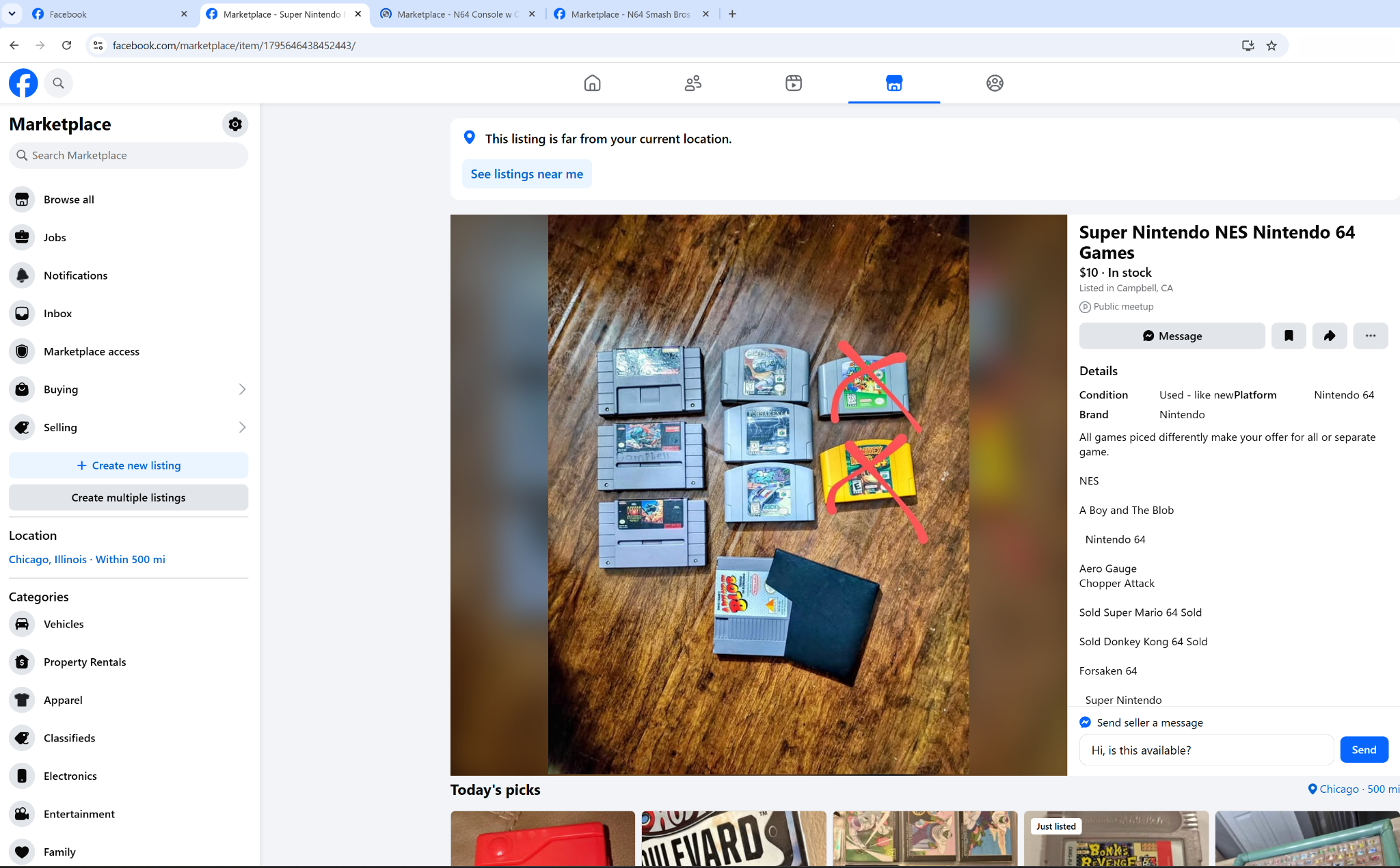
In the example above, opening the listing reveals a much fuller description and additional details. That extra context is why simply reading the search-result card is not always enough for collector searches.
Discovery can be broad while matching stays strict
Finding a listing during a Marketplace search does not automatically put it on your RareAlert Radar. Candidate listings still have to pass the rules from the saved search, including required keywords, excluded keywords, collectible-specific matching, and other applicable filters.
This separation is important: location rotation and alternate phrases help RareAlert find more candidates, while the matcher decides which ones are actually relevant.
What happens while the Facebook Marketplace queue runs
Keep a Facebook Marketplace tab open and stay signed in to Facebook. RareAlert moves through queued searches, waits for Marketplace results to load, checks the listings it finds, and performs deeper listing checks when necessary.
You can continue using other browser tabs while the scan runs. The Marketplace tab may change locations and searches, and additional listing tabs can briefly open when RareAlert needs to inspect a candidate more closely.
How to use nationwide Facebook Marketplace scanning in RareAlert
- Install the RareAlert Marketplace Scanner from the Chrome Web Store.
- Create or edit a saved search in RareAlert.
- Enable Facebook Marketplace for that search.
- Stay signed in to Facebook and keep a Marketplace tab open.
- Set the Facebook Marketplace radius to 500 miles.
- Start the Marketplace scan from the RareAlert extension.
- Review qualifying Facebook matches that appear on your RareAlert Radar.
RareAlert currently uses Facebook Marketplace scanning to surface matching listings in the dashboard. It should not be interpreted as a guarantee that every nationwide Marketplace listing will be found.
Learn more about how the Facebook scanner works
For the broader setup and matching workflow, read how Facebook Marketplace scanning works with RareAlert. You can also read why Facebook Marketplace results change by location.