
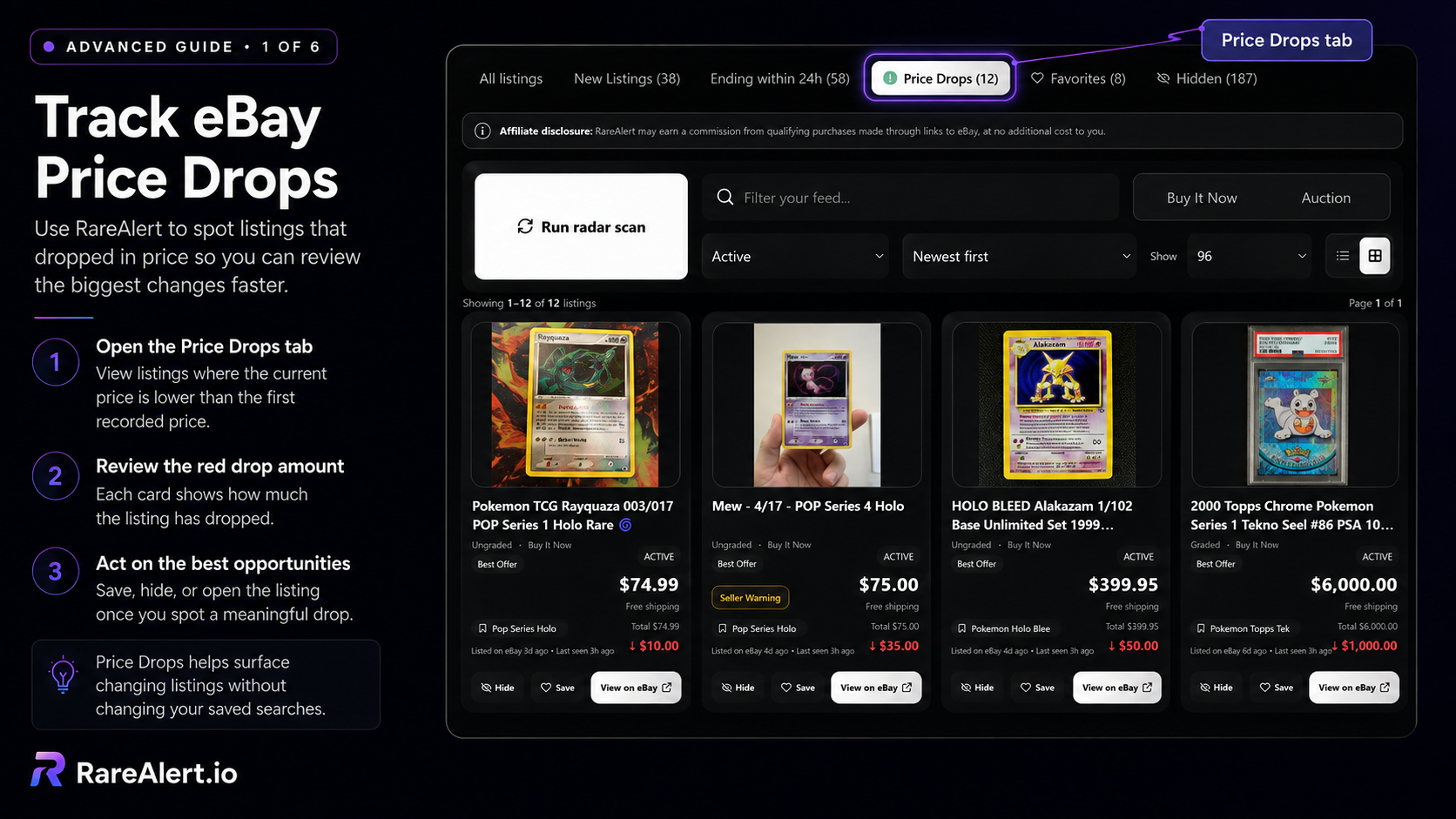
What RareAlert counts as a price drop
RareAlert compares the first recorded listing price with the current listing price. A listing appears in the Price Drops feed only after the current price is at least 10% lower than that first recorded price.
The 10% threshold prevents tiny changes from cluttering the feed or generating notifications that are not worth opening.
A listing first recorded at $100 must fall to $90 or less to qualify. A change from $100 to $99 does not appear as a price-drop alert.
Open the dedicated Price Drops tab
The Price Drops tab isolates qualifying changes from the full listing feed. The count in the tab shows how many matching listings currently meet the price-drop rule.
Each listing card shows the current price and a red downward amount representing the difference from the first recorded price.
Filter the dropped listings
Use the feed search, status filter, sort order, and Buy It Now or Auction controls to narrow the current view. These controls do not rewrite the saved search.
A focused saved search still matters. Required keywords and exclusions reduce false matches before price changes are evaluated.
Review, save, hide, or open the listing
Save a promising listing to Favorites, hide an irrelevant result, or open the listing on eBay when the new price looks worthwhile.
Price drops do not guarantee that a listing is under market value. Compare condition, shipping, seller details, recent sold prices, and the exact variant before buying.